How to Use E-Wallets in Online Casinos - Complete Step-by-Step Guide
This step-by-step tutorial transforms theoretical e-wallet knowledge into practical execution skills. Learn hands-on procedures: creating your first digital wallet account, completing verification that satisfies Australian AML/CTF requirements, and linking wallets to casinos. Master deposit execution, withdrawal processing, and common error troubleshooting to make gaming seamlessly operational.
Choose an e-wallet matching your casino gaming priorities before registration-the right selection prevents switching costs later when you discover incompatibilities or unsuitable fee structures.
Decision Criteria for Australian Players
Prioritize three factors: AUD native support (eliminates 2-3% currency conversion fees), Australian casino acceptance (verify your target casinos from our directory accept the wallet), and fee structure alignment with your play frequency. PayID offers zero-fee AUD transactions with instant processing-ideal for casual players making 2-5 deposits monthly. Skrill suits strategic players comfortable with 1% deposit fees in exchange for high transaction limits ($50,000+ daily) and VIP rewards programs. Neteller mirrors Skrill's structure with 2-2.5% fees but faster withdrawal processing (instant versus 12-hour). Apple Pay and Google Pay serve mobile-first players wanting biometric authentication convenience, though transaction limits cap around $5,000 daily. For detailed wallet comparisons, see our payment methods comparison page.
Registration Requirements Preview
Before committing to a wallet, verify you can meet registration requirements: valid email address, Australian mobile number for SMS verification, government-issued photo ID (driver's license, passport), proof of residential address (utility bill, bank statement under 3 months old), and linked funding source (Australian bank account or credit/debit card). PayID requires existing Australian bank account with participating financial institution. International wallets (Skrill, Neteller) accept international funding sources but require additional identity verification for Australian residents under AML regulations.
Step 2: Creating Your E-Wallet Account
E-wallet account creation follows standardized procedures across providers, typically completing in 5-15 minutes for basic registration before verification.
Basic Registration Process
Navigate to wallet provider website (paypal.com for PayPal, skrill.com for Skrill, neteller.com for Neteller) or download mobile app from official app stores. Click "Sign Up" or "Register" button. Enter email address (use dedicated email for gambling transactions to separate from personal accounts), create strong password (12+ characters mixing uppercase, lowercase, numbers, symbols-avoid common words or personal information), and provide personal details: full legal name (must match government ID exactly), date of birth (must be 18+ for gambling), residential address (must match proof of address document), and mobile phone number with country code (+61 for Australia). Accept terms of service after reading (particularly sections covering gambling transactions, chargebacks, and account freezing policies). Verify email through confirmation link sent to provided address-click within 24 hours or registration expires requiring restart.
Identity Verification (KYC) Requirements
After basic registration, wallets require identity verification (Know Your Customer/KYC) before enabling full functionality-withdrawals and large deposits remain blocked until completion. Upload clear, color photos or scans of: government-issued photo ID (driver's license showing both sides, passport bio page, or national ID card), proof of residential address dated within 3 months (utility bill showing name and address, bank statement, government letter-screenshots not accepted, must be original document), and sometimes payment method verification (bank statement showing account number and name, credit card photo showing first 6 and last 4 digits with middle numbers obscured). Ensure documents show all four corners, text remains legible, and no glare obscures information-blurry or partial documents trigger automatic rejection extending verification by 2-5 days. PayID skips traditional KYC since verification occurs through Australian banking system during account linking.
Processing Timeframes
Verification processing varies by provider and submission quality. PayPal typically completes verification within 2-3 business days. Skrill processes within 24-48 hours. Neteller averages 24 hours. PayID verifies instantly during bank account linking. Submit documents immediately after registration rather than waiting until first withdrawal attempt-proactive verification prevents frustrating delays when you want to cash out winnings. Check verification status in account settings/security section-unverified accounts display warnings or restrictions.
Step 3: Linking Funding Sources
Connect Australian bank account or card to fund your e-wallet. Enter BSB, account number, and holder name for bank linking-wallets verify via micro-deposits ($0.01-$0.50) you confirm in interface, or PayID uses instant bank authentication. For cards, enter number, expiration, CVV-wallet charges small verification amount ($1-2) you confirm from statement. Visa/Mastercard process smoothly; Amex acceptance varies by wallet.
Step 4: Registering at E-Wallet Casino
With funded wallet ready, register at casino supporting your chosen e-wallet. Select casino from our directory ensuring e-wallet appears in their accepted payment methods.
Casino Account Creation
Click casino's "Sign Up" or "Register" button. Complete registration form: email address (again, consider dedicated gambling email), username (unique identifier for login-not your real name), password (12+ characters, different from e-wallet password), full name (exactly as appears on ID), date of birth (casinos verify age against provided ID), residential address, mobile number, and currency preference (select AUD). Choose username carefully-most casinos prohibit changes after registration. Accept casino's terms and conditions plus privacy policy-note sections covering bonus terms, responsible gambling tools, and withdrawal procedures. Some casinos require checking marketing consent separately-uncheck if you don't want promotional emails.
Casino KYC Verification
Casinos require separate KYC verification independent of e-wallet verification. Navigate to account settings or verification section (sometimes labeled "Documents" or "My Account"). Upload same document types as e-wallet KYC: photo ID, proof of address, and sometimes payment method screenshot (your e-wallet account page showing your name and wallet email address). First-time verification processes within 24-72 hours. Subsequent logins at different casinos from same operator group sometimes inherit verification-ask support if verification can transfer to expedite process. Pro tip: complete casino KYC immediately after registration, not when attempting first withdrawal-proactive verification means when you win and want to cash out, processing starts immediately rather than entering 24-72 hour verification queue.
Step 5: Making Your First Deposit
Execute first deposit to fund casino balance and start playing. E-wallet deposits process faster than traditional banking-funds typically appear within seconds to minutes.
Deposit Procedure Step-by-Step
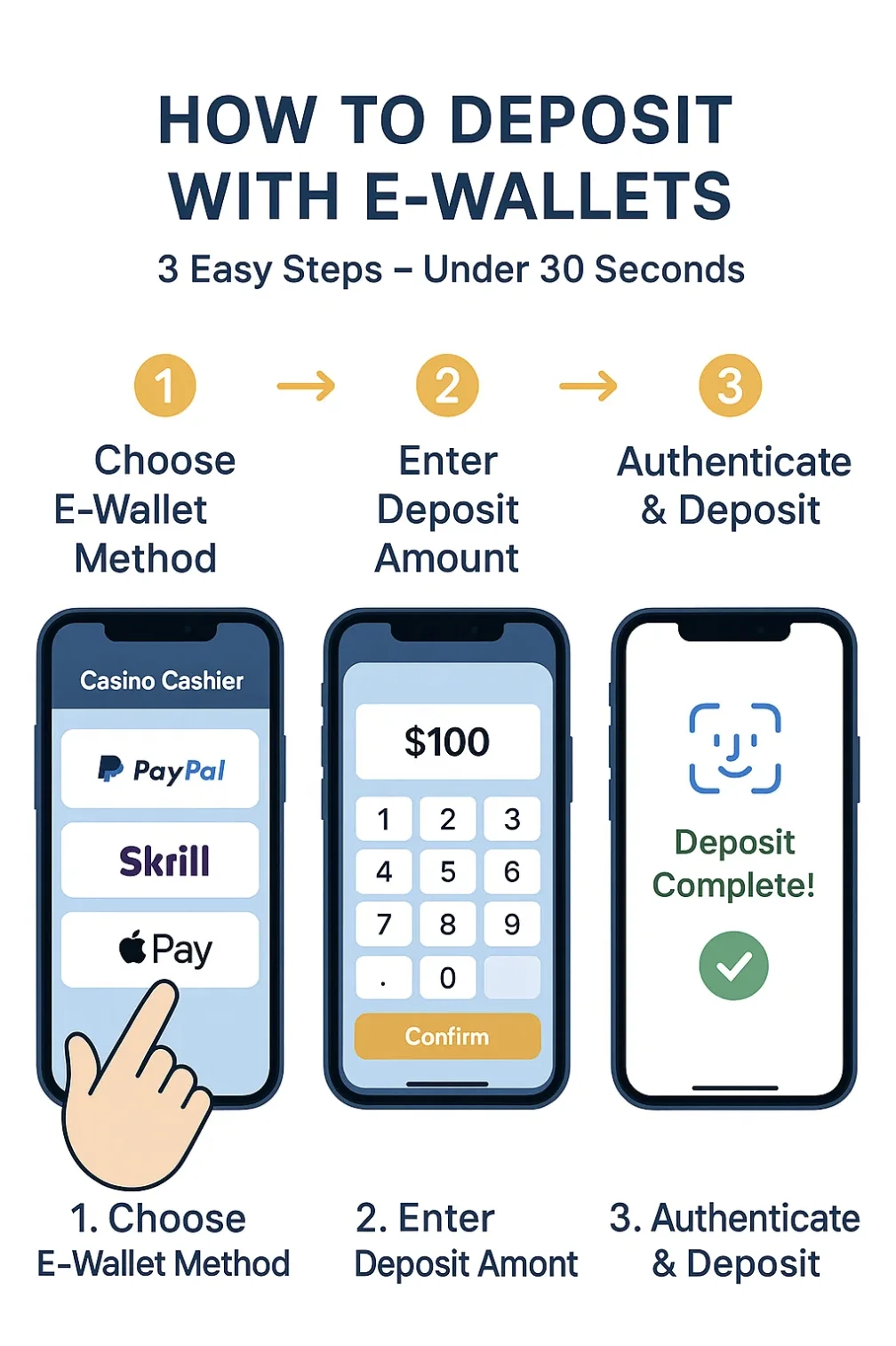
Log into casino account. Navigate to cashier/banking section (usually accessible from main navigation or account menu). Click "Deposit" or "Add Funds" button. Select your e-wallet from payment method list (look for your wallet's logo-PayPal, Skrill, Neteller, PayID, etc.). Enter deposit amount in AUD-respect minimum deposit (typically $10-30) and maximum deposit (varies by wallet and casino, often $5,000-10,000 per transaction). Some casinos display available bonuses at this stage-select bonus if desired (note: some bonuses restrict which games you can play or impose wagering requirements). Click "Continue" or "Deposit Now". System redirects to e-wallet login page. Enter e-wallet credentials (username/email and password). If 2FA enabled (recommended), enter authentication code from authenticator app or SMS. Review transaction summary showing amount, recipient casino, and any fees. Click "Confirm" or "Pay Now". System redirects back to casino site. Funds appear in casino balance immediately or within 1-5 minutes (refresh page if balance doesn't update automatically).
Common Deposit Issues and Solutions
"Payment method not available": Your selected e-wallet isn't supported at this casino or in your region-contact casino support to confirm payment options, or select different casino from our directory. "Insufficient funds": Your e-wallet balance lacks sufficient funds to cover deposit plus any fees-fund wallet from linked bank/card first, then retry casino deposit. "Transaction declined": Multiple causes possible-insufficient funds, incorrect wallet credentials entered, e-wallet blocking gambling transactions (some wallets restrict gambling in certain jurisdictions), or casino blocking payments from your wallet type. Check wallet transaction history to see if payment attempt recorded. Contact both wallet and casino support with transaction reference number if issue persists. "Deposit not credited": Payment successful but funds not appearing in casino balance-wait 5-10 minutes as processing can delay. Clear browser cache and re-login. Check casino transaction history to verify payment recorded. Contact casino support with wallet transaction ID if delay exceeds 30 minutes.
Step 6: Withdrawing Winnings
Navigate to casino cashier, click "Withdraw", select same e-wallet used for deposits (AML requirement), enter amount ($10-20 minimum, respect daily/weekly limits), enter wallet email matching casino account. First withdrawal requires completed KYC (24-72 hours if not done proactively). After casino approval, funds reach wallet within minutes to hours (Neteller instant, Skrill 1-12h, PayPal 12-24h), then transfer to bank (1-3 business days). Common delays: verification required (upload documents), wagering not met (complete 30-40x playthrough if bonus claimed), wrong email (verify details match), limit exceeded (wait for period reset).
Security Best Practices
Implement security measures protecting both e-wallet and casino accounts from unauthorized access and fraud.
Two-Factor Authentication (2FA)
Enable 2FA on both e-wallet and casino accounts immediately after registration. 2FA requires second verification factor beyond password-even if someone steals your password, they cannot access account without second factor. Prefer authenticator app 2FA (Google Authenticator, Authy) over SMS 2FA-SMS vulnerable to SIM-swapping attacks where criminals hijack your phone number. To enable: navigate to security settings, select "Enable 2FA" or "Two-Factor Authentication", choose authenticator app option, scan QR code with authenticator app, enter 6-digit code displayed in app to confirm setup, save backup codes provided (use if you lose phone/app access). After enabling, each login requires password plus current 6-digit code from authenticator app-codes rotate every 30 seconds.
Password and Monitoring
Use unique 16+ character passwords mixing uppercase, lowercase, numbers, symbols-never reuse across accounts. Consider password manager (1Password, Bitwarden, LastPass) to generate and store complex passwords. Change every 6-12 months or if compromised. Review transaction history weekly for unauthorized activity-enable email/SMS alerts for instant detection. If suspicious activity spotted: change passwords immediately, revoke all active sessions, contact support to freeze account.
Verify funds, check wallet gambling restrictions, contact support
Maintain sufficient balance, use gambling-friendly wallets
"Invalid credentials"
Wrong email/password entered
Double-check spelling, use password reset if forgotten
Use password manager, enable autofill
"Verification required"
KYC incomplete or expired
Upload/update required documents in verification section
Complete verification proactively at registration
"Payment method not supported"
Wallet not accepted at casino/region
Select different wallet or casino supporting your wallet
Verify wallet acceptance before registering
"Withdrawal limit exceeded"
Requested amount over daily/weekly cap
Reduce amount or wait for period reset
Check withdrawal limits in cashier before requesting
"Account suspended"
Terms violation or security flag
Contact support for details and resolution
Follow terms, avoid suspicious patterns
Login and Payment Issues
Login failures: clear browser cache/cookies, try different browser or incognito mode, check service outage on official status page, verify caps lock off, use password reset if needed. Payment failures despite sufficient funds: check wallet gambling restrictions (some banks block merchants), verify casino accepts your specific wallet type, confirm AUD currency use (not requiring conversion), try smaller amount, contact both wallet and casino support-often issue lies with intermediary payment processor.
Mobile App Usage
Download official apps only from Apple App Store (iOS) or Google Play Store (Android)-avoid third-party sources (malware risk). Verify publisher matches official company, check millions of downloads and recent updates (within 3 months). Enable biometric login (Face ID, Touch ID) for security and speed. Mobile deposit/withdrawal: open casino app, tap banking, select e-wallet, enter amount-app redirects to wallet app automatically, authenticate, confirm, return to casino. Apple Pay/Google Pay offer streamlined experience with biometric confirmation without app switching.
Summary: E-Wallet Usage Workflow
E-wallet casino workflow: select wallet matching priorities (PayID zero fees, Skrill high limits), register providing accurate information, complete KYC uploading clear ID/address documents, link bank/card funding source, register at casino from our directory, complete casino KYC proactively, deposit via wallet in cashier ($10-30 minimum), play responsibly, withdraw using same method (respect bonus wagering), receive funds in wallet (12-48 hours), transfer to bank (1-3 days). Enable 2FA, use strong unique passwords, monitor transactions, complete verification early. For wallet selection, see payment comparison page. For casinos, visit best casinos ranking. For security, check responsible gambling guide.
F.A.Q
Log into casino, navigate to cashier, select your e-wallet from payment methods, enter deposit amount, confirm-system redirects to wallet login, authenticate, approve payment. Entire process completes in 1-2 minutes.
E-wallet KYC verification processes within 24-72 hours depending on provider. PayPal typically 2-3 business days, Skrill 24-48 hours, Neteller 24 hours, PayID instant during bank linking.
Common causes: insufficient wallet balance, incorrect wallet credentials entered, e-wallet blocking gambling transactions, casino payment processor temporarily down, or exceeded transaction limits. Check wallet transaction history to confirm.
Yes, single e-wallet account works across multiple casinos accepting that wallet type-no need for separate wallet account per casino. This simplifies fund management and transaction tracking.
Yes, e-wallet and casino require independent KYC verification. Both typically require same documents but process independently-wallet verification doesn't transfer to casino or vice versa.